
Introduction
A Facebook page isn’t just a social profile; it’s a landing page that works while you sleep. Facebook Page Optimization is one of the most effective ways for businesses to engage with their audience. However, simply having a page isn’t sufficient if it isn’t optimized; otherwise, you risk missing out on potential leads and revenue. By optimizing your Facebook page, you help your business appear professional, draw in the right audience, and turn visitors into customers.
By following a structured Facebook page optimization checklist with 10 actionable steps, you can enhance your page’s visibility and engagement, and ultimately drive business growth. Let’s dive in!
10-Step Facebook Page Optimization
Step 1: Claim Your Custom URL (Vanity URL)
Facebook Page Optimization starts with making your page easy to find. A clean, memorable URL:
- Builds credibility and trust
- Makes your page easier to find and share
- Reinforces your brand across platforms
- Lays the foundation for a practical Facebook page optimization checklist.
Claiming a custom URL is the first step to optimizing your Facebook business page for better visibility and engagement.
How to Claim Your Custom URL
- Go to your Facebook Page Settings.
- Click Create @username or Edit Page @username.
- Choose a username that matches your business name or brand.
- Keep it short, simple, and easy to remember.
- Confirm availability and save your new URL.
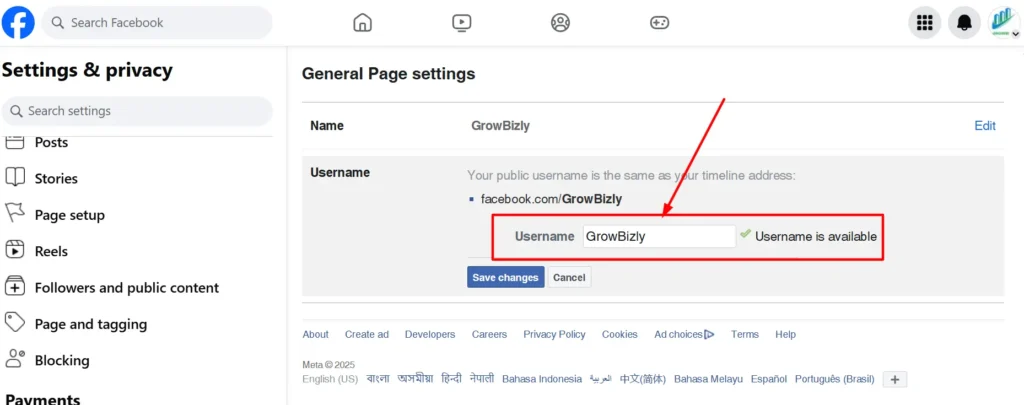
Tip: Avoid symbols, underscores, or numbers unless necessary.
SEO Benefits
- Improves Facebook search visibility
- Helps Google index your page for branded search queries
- Supports long-term growth by making your page easier to discover
Branding Consistency Tips
- Use the same username across all social media platforms
- Ensure it aligns with your business name or brand identity
- Keep it professional and easy to spell
Claiming your custom URL is the initial key step in Facebook Page Optimization, making your page professional, easy to find, and prepared for additional improvements.
Step 2: Optimize Profile & Cover Images
Your visuals are the “storefront” of your digital business. Before a visitor reads a single word, they judge your professionalism by your images. To properly optimize your Facebook page, treat this visual real estate as high-value marketing property. This is a crucial part of Facebook Page Optimization.
High-Resolution Profile Picture (Logo Recommended)
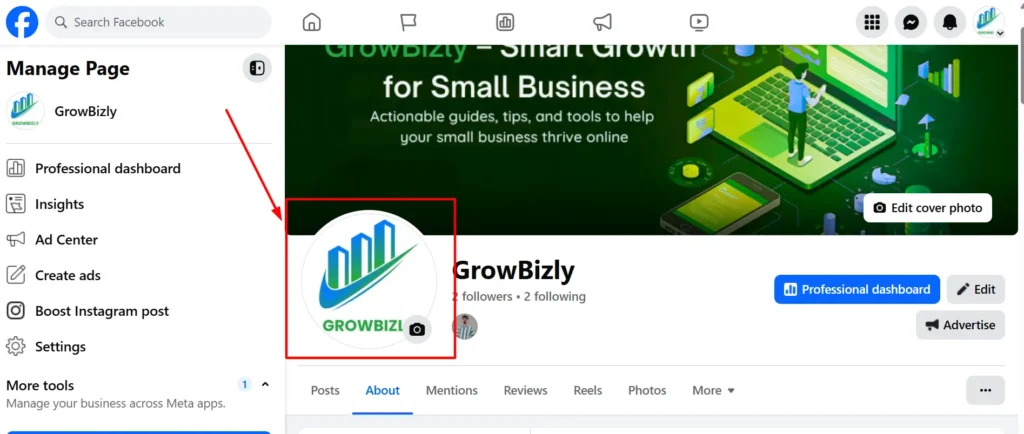
Your profile picture is the most viewed image on your page because it appears next to every comment and post in the news feed. For a business:
- Use a clean, high-resolution logo.
- Avoid photos with small text. Instead, use a simplified logo that remains legible at small thumbnail sizes.
- Maintain consistency across your posts and platforms to reinforce brand recognition.
This step is essential in how to optimize your Facebook page because it builds instant trust and professional credibility.
Cover Photo as a “Billboard” for Your Lead Magnet
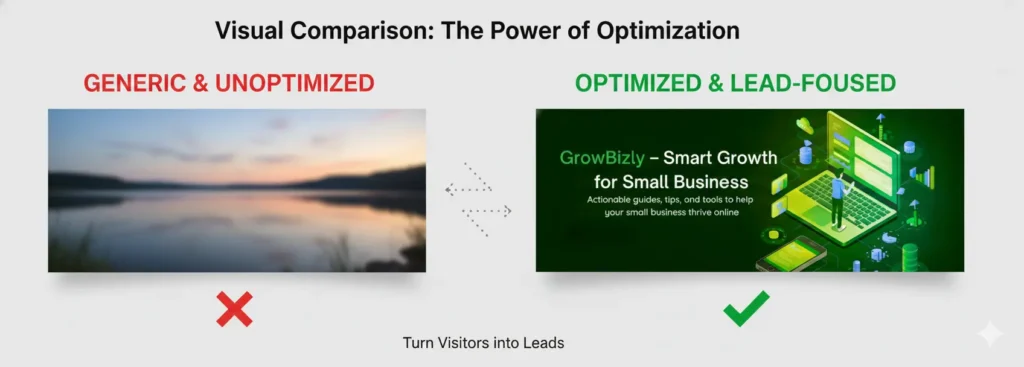
Many businesses make the mistake of using a generic landscape photo as their cover. To truly optimize your Facebook business page, treat your cover photo as a billboard. Use this space to:
- Promote a current offer or discount.
- Showcase a lead magnet (like a free eBook or webinar).
- Feature a clear Call-to-Action (CTA) directing users to your “Contact” button or lead form.
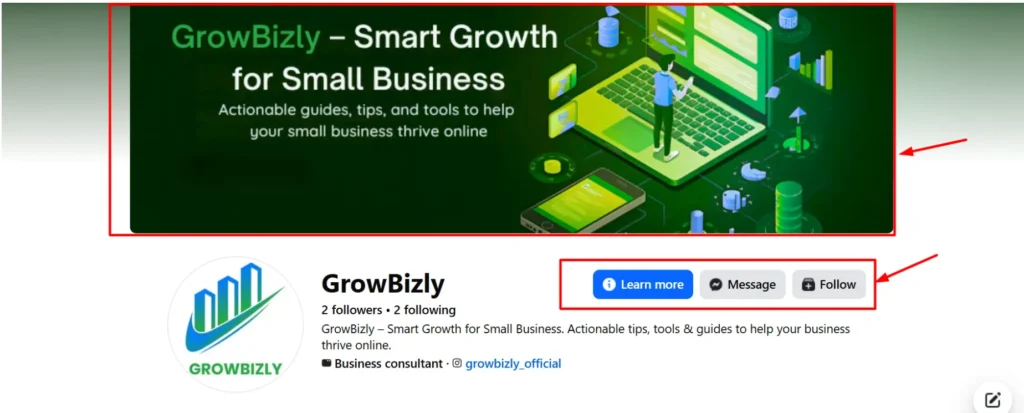
A visually compelling cover photo can directly influence engagement and conversions.
Recommended Dimensions and Mobile Optimization Tips
A significant part of the SEOof a Facebook page is user experience. If your cover photo appears perfect on desktop but essential text gets cut off on mobile, you could miss out on potential leads.
- Dimensions: 820 x 312 pixels for desktop; 640 x 360 pixels for mobile.
- Safe Zones: Keep all text and key imagery in the center to prevent cropping on smaller screens.
By optimizing both your profile picture and cover photo, you enhance brand perception, engagement, and conversions—all vital for effective Facebook Page Optimization.
Step 3: Write a Keyword-Rich About Section
The “About” section is one of the most essential parts of your Facebook business page. It not only tells visitors who you are and what you do, but also plays a key role in Facebook Page Optimization and search engine optimization for the Facebook page. A well-crafted About section can improve visibility in Facebook search, highlight your services, and encourage visitors to take action.
How to Optimize Your About Section
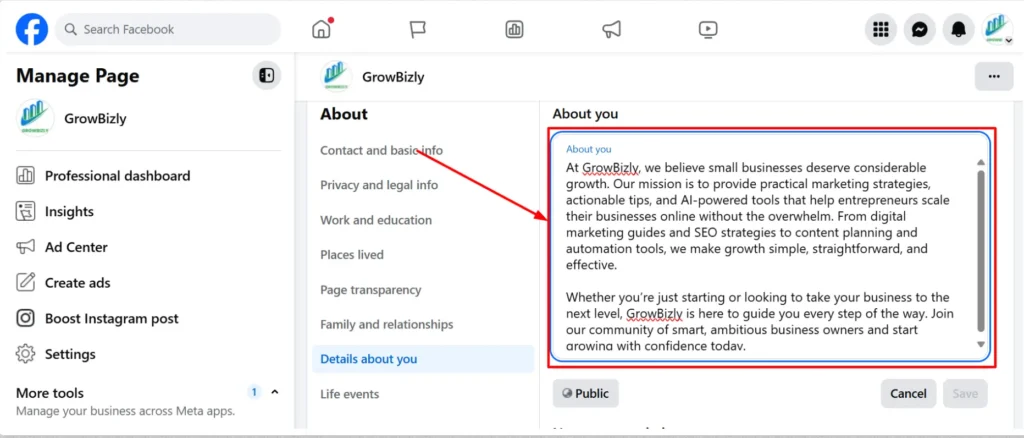
- Add a Business Description Naturally with Target Keywords
- Use your primary and secondary keywords naturally, e.g., “Facebook Page Optimization” or “how to optimize your Facebook page.”
- Explain what your business does and what problems you solve.
- Avoid keyword stuffing; readability is key.
- Highlight Services, Target Audience, and Value Proposition
- Clearly list your core services or products.
- Identify your ideal audience.
- Emphasize what sets your business apart from competitors.
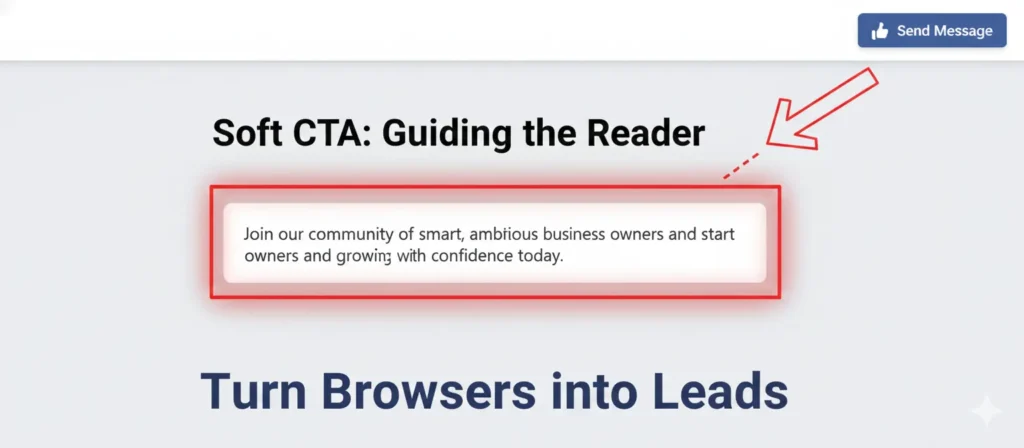
- Include a Soft Call-to-Action (CTA)
- Encourage users to visit your website, sign up for a newsletter, or contact you.
- Example: “Message us today to get a free consultation” or “Visit our website to learn more.”
- A soft CTA subtly guides visitors toward conversion without being pushy.
By crafting a keyword-rich About section, you improve both Facebook search visibility and user engagement while laying the groundwork for lead generation.
Step 4: Choose the Right Page Template
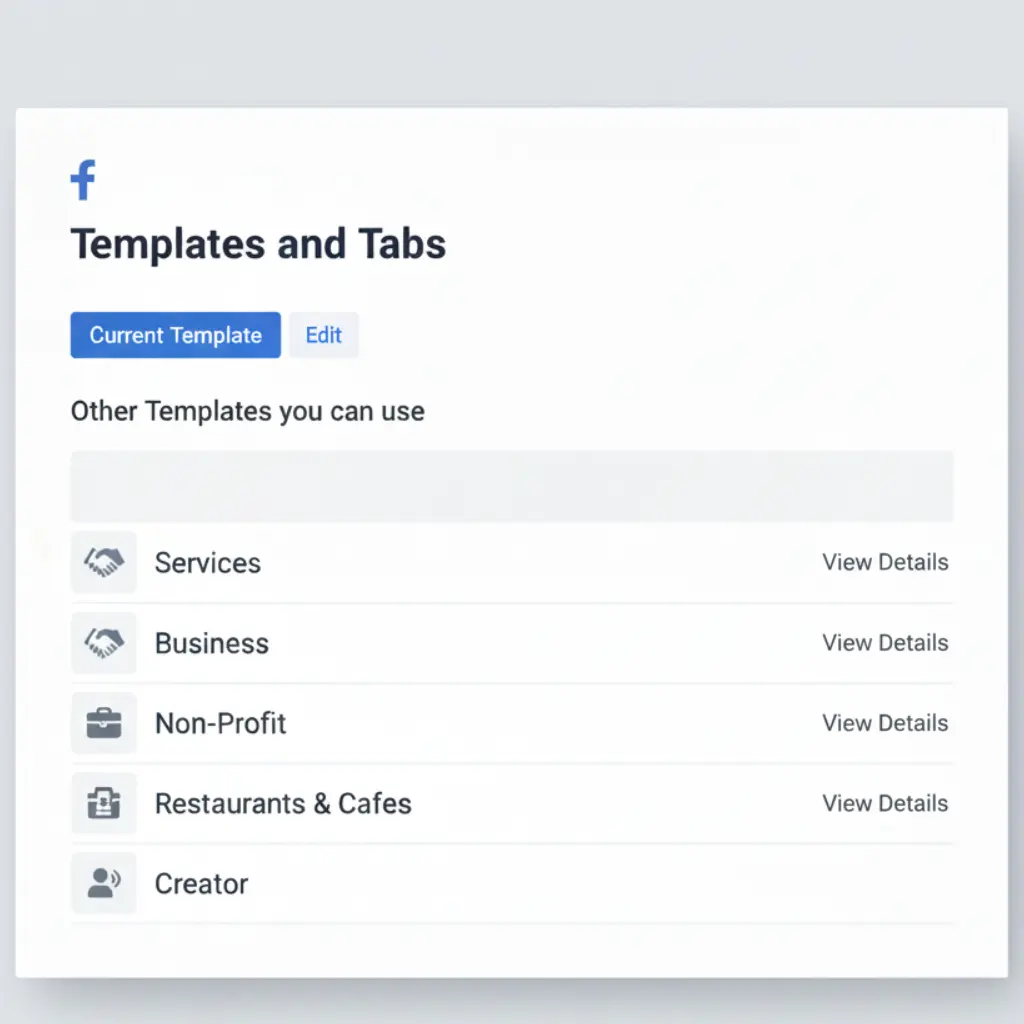
Choosing the right Facebook page template is a crucial part of Facebook page optimization. The template determines which features are available on your page, such as services, shop, reviews, or call-to-action buttons. Selecting the correct template ensures your page is structured for lead generation, engagement, and conversions.
Using the wrong template can limit your page’s functionality and make it harder for visitors to find key information, ultimately reducing your ability to convert them into customers.
How to Choose the Right Template
- Select a Business or Services Template
- Go to Settings > Templates and Tabs on your Facebook page.
- Choose Business or Services depending on your offerings.
- These templates unlock lead-generation features like the Services tab, Shop, and Reviews.
- Unlock Additional Features
- Services Tab: Showcase what you offer with pricing, descriptions, and visuals.
- Shop Tab: Sell products directly from your page.
- Reviews Tab: Collect and display social proof to build trust.
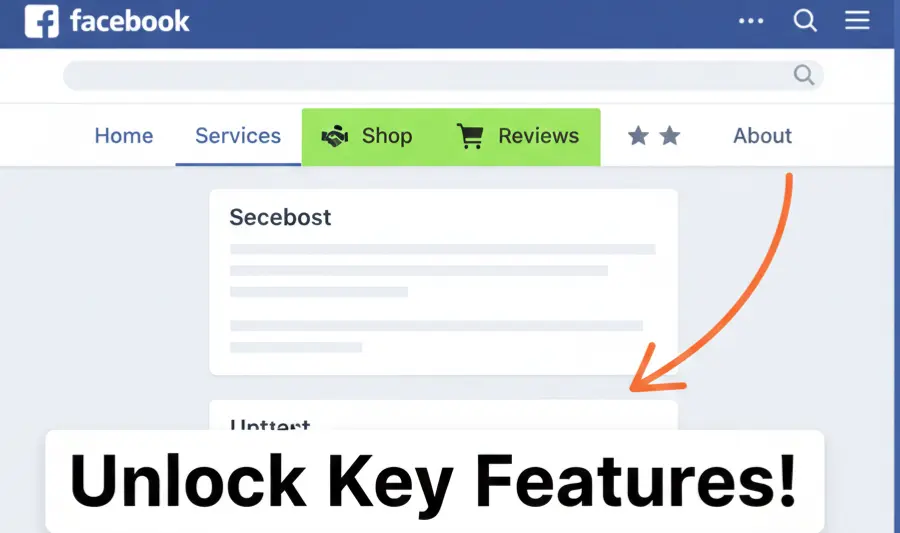
Choosing the correct template is a simple but essential step in how to optimize your Facebook business page, helping you maximize engagement and lead potential.
Step 5: Configure the Primary Call-to-Action (CTA) Button
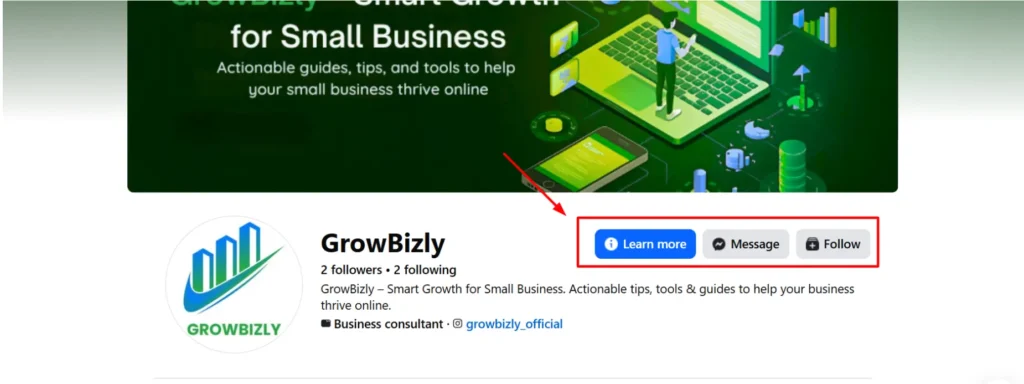
The primary Call-to-Action (CTA) button is one of the most essential elements for converting visitors into leads on your Facebook page. A clear, strategically placed CTA guides users to the action you want, whether booking a service, sending a message, or requesting a quote.
Properly configuring your CTA is a key part of Facebook Page Optimization and directly impacts engagement, lead generation, and conversions.
How to Configure the CTA Button
- Choose the Right CTA
- Navigate to Edit Page > Add a Button.
- Select the most relevant CTA for your business type:
- Book Now: For appointment-based services.
- Get Quote: For service inquiries.
- Send Message: For direct customer engagement.
- Make sure it aligns with your lead funnel and business goals.
- Align CTA with Conversion Goals
- Ensure the CTA links to the proper landing page, contact form, or messaging platform.
- Test different CTAs to see which generates the most engagement.
- Consistently monitor and tweak for optimal results.
A well-placed CTA is essential in how to optimize your Facebook business page, as it directly influences how efficiently your page turns visitors into customers.
Step 6: Enable and Organize Page Tabs
Page tabs are the backbone of your Facebook business page. Well-organized, correctly enabled tabs enhance the user experience, highlight your services, and showcase social proof. Prioritizing the right tabs is a crucial step in Facebook Page Optimization, helping visitors quickly find what they need while boosting credibility.
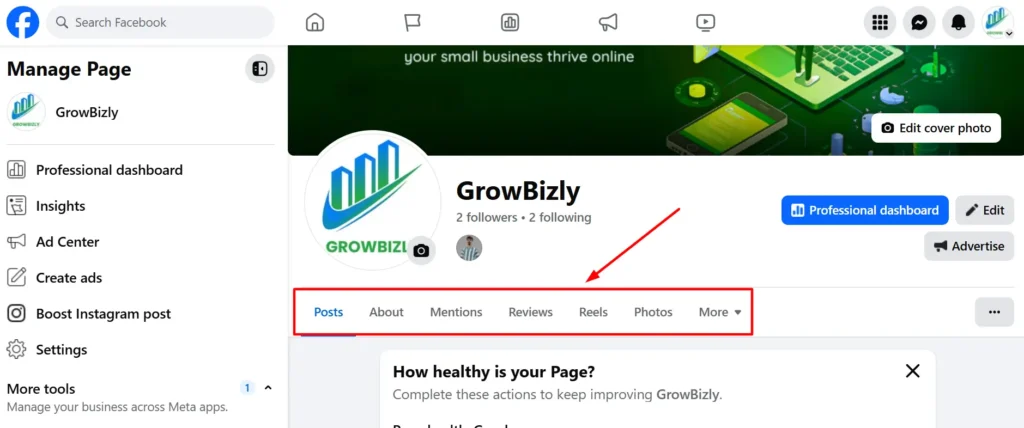
By strategically organizing tabs, you make your page easier to navigate and increase the likelihood that visitors will engage with your content, explore your services, and take action.
How to Enable and Organize Tabs
- Prioritize Key Tabs
- Reviews Tab: Builds trust through social proof.
- Services Tab: Showcases your offerings with precise descriptions and pricing.
- Shop Tab: Let’s customers browse and purchase products directly.
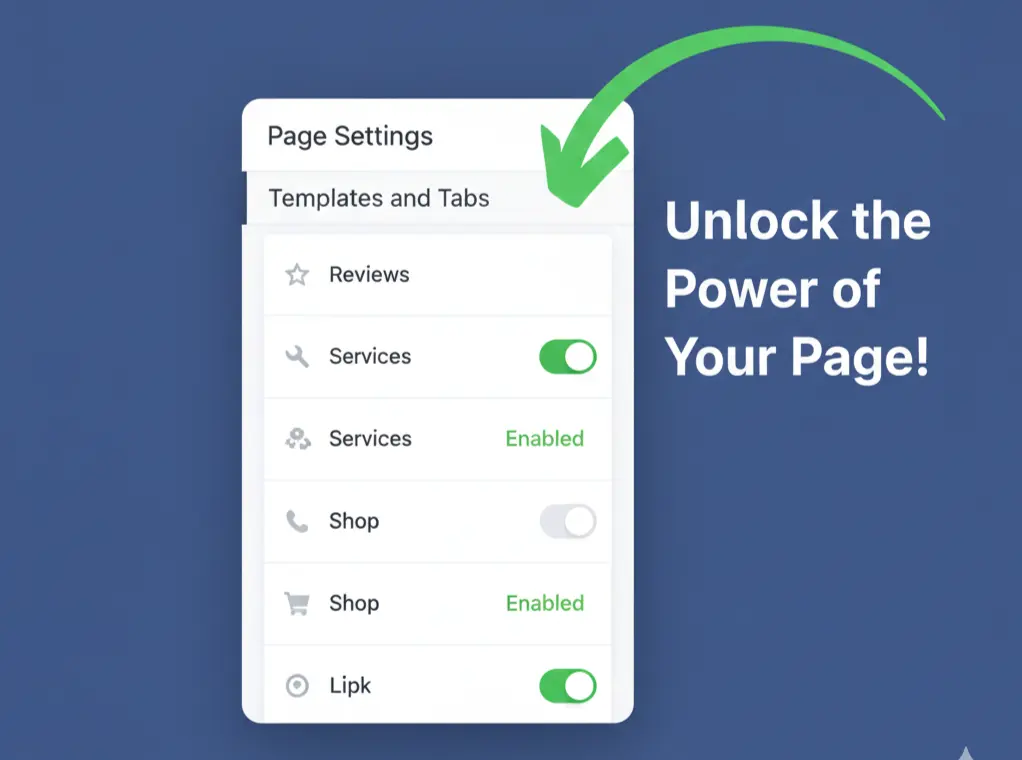
- Organize Tabs for User-Friendly Navigation
- Place the most essential tabs at the top for easy access.
- Hide tabs that are irrelevant to your business to reduce clutter.
- Ensure that your layout aligns with your lead funnel and conversion goals.
Proper tab organization is a simple yet powerful step in how to optimize your Facebook business page, improving navigation and overall user engagement.
Step 7: Set Up Automated Messaging
Automated messaging is a powerful feature for Facebook Page Optimization because it ensures no leads slip through the cracks. Many visitors message your page outside of business hours or expect instant responses. By enabling automation, you can respond immediately, answer frequently asked questions, and guide users toward conversion without manually monitoring your inbox 24/7.
How to Set Up Automated Messaging
- Enable Instant Replies
- Turn on Instant Replies in Meta Business Suite.
- Greet visitors automatically and provide a brief overview of your services.
- Include a soft call-to-action (CTA) like “Message us to book your free consultation today!”
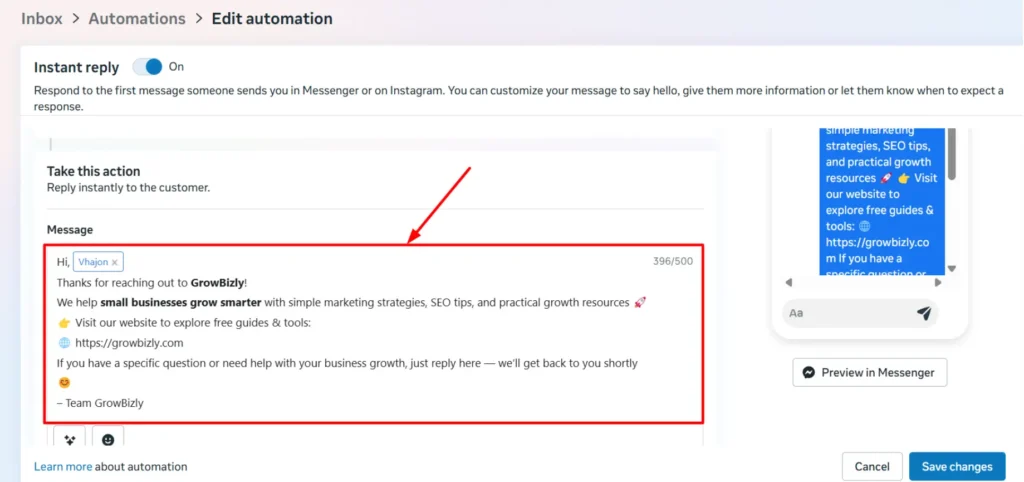
- FAQ Automation
- Add common questions and answers in the automated messaging setup.
- Examples: “What are your business hours?” or “Do you offer online consultations?”
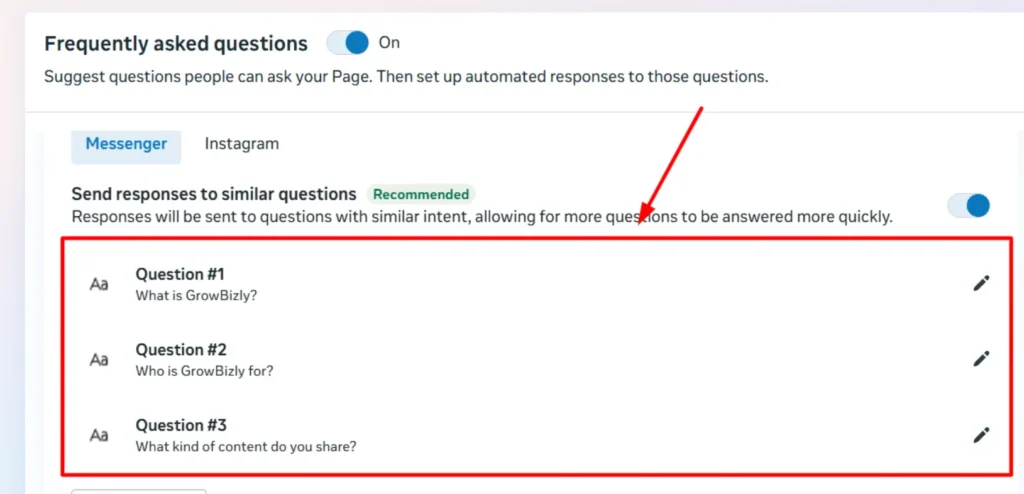
- Optimize Response Time
- Set expectations for response time, e.g., “We usually reply within 1 hour.”
- This builds trust and encourages visitors to interact rather than leave your page.
Automated messaging is an essential part of how to optimize your Facebook business page, improving user experience, engagement, and lead capture efficiency.
Step 8: Pin a High-Value Post
Pinning a high-value post at the top of your page is a clever tactic for Facebook Page Optimization. It ensures that every visitor sees your most important message first, whether it’s a lead magnet, a special offer, or a customer testimonial. A well-crafted pinned post can immediately capture attention, build trust, and drive conversions.
Using a structured approach like problem → solution → CTA helps your pinned post generate maximum engagement and leads.
How to Pin a High-Value Post
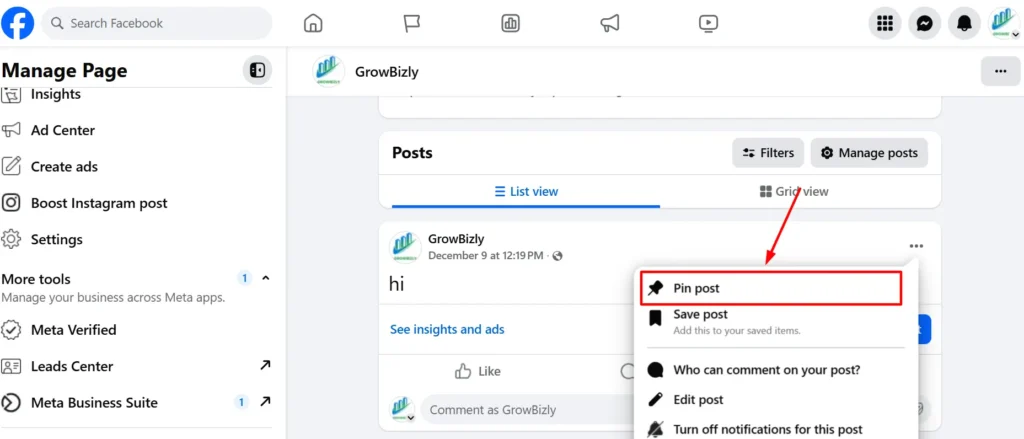
- Select Your Post Type
- Choose a post that adds immediate value, such as:
- Lead magnet (e.g., free eBook, checklist, webinar)
- Limited-time offer or discount
- Customer testimonial or success story
- Choose a post that adds immediate value, such as:
- Use the Problem → Solution → CTA Formula
- Problem: Identify the challenge your audience faces.
- Solution: Present your product, service, or free resource as the solution.
- CTA: Encourage users to take action, e.g., “Download now,” “Sign up today,” or “Message us for a free consultation.”
- Pin the Post
- Click the three dots on the top-right corner of your post.
- Select “Pin to Top of Page” to make it visible to all visitors.
Pinning a high-value post is a key tactic in how to optimize your Facebook business page, as it keeps your most important content front and center for maximum conversions.
Step 9: Post High-Quality Content & Engage Regularly
Consistently posting high-quality content is essential to Facebook Page Optimization. Great content keeps your audience engaged, builds trust, and encourages interaction, which signals to Facebook’s algorithm that your content should be boosted. Engagement also drives leads, strengthens your brand, and nurtures customer relationships.
By posting strategically and engaging with followers, you turn your page into a lead-generating hub rather than a static profile.
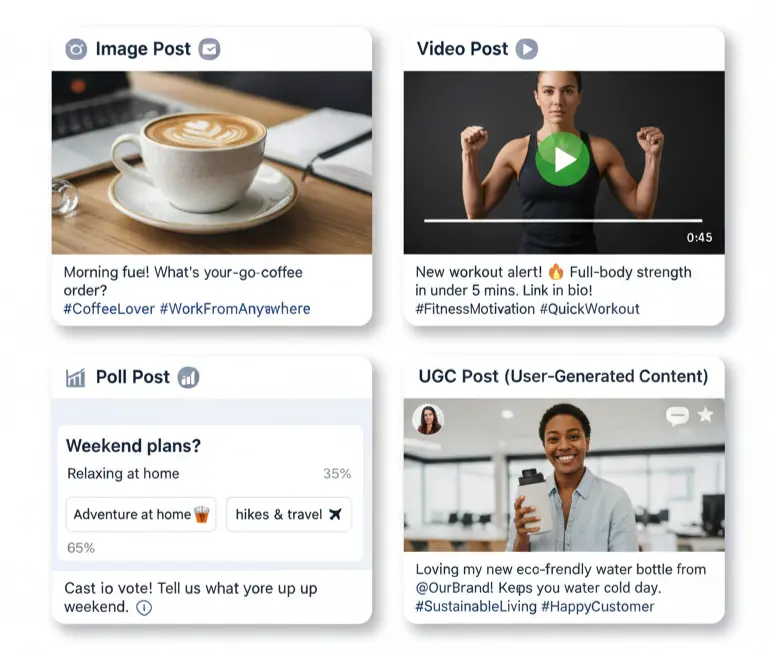
How to Post High-Quality Content & Engage
- Content Types That Drive Engagement
- Images & Graphics: Share branded visuals, product shots, or infographics.
- Videos: Tutorials, behind-the-scenes, customer testimonials.
- Polls & Quizzes: Interactive posts encourage participation.
- User-Generated Content (UGC): Share customer photos or reviews to boost trust.
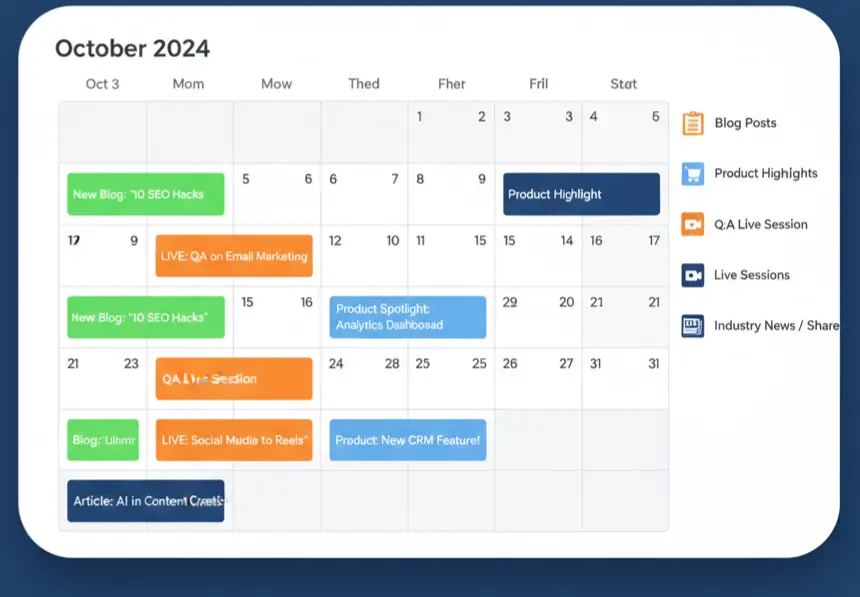
- Maintain a Consistent Posting Schedule
- Post regularly (2–5 times per week) to stay top-of-mind.
- Use scheduling tools like Meta Business Suite for consistency.
- Track post performance to identify the most engaging content types.
- Engage With Your Audience
- Respond promptly to comments and messages.
- Encourage conversation with questions or prompts in posts.
- Highlight UGC to show appreciation and build community.
Regularly posting high-quality content and engaging with your audience is a key tactic in how to optimize your Facebook business page, helping you boost reach, trust, and conversions.
Step 10: Optimize for Facebook Search & Insights
Optimizing your Facebook page for search and insights is a crucial step in Facebook Page Optimization. Proper tagging, category selection, and location settings help your page appear in relevant searches, while monitoring insights lets you adjust your strategybased on real performance data.
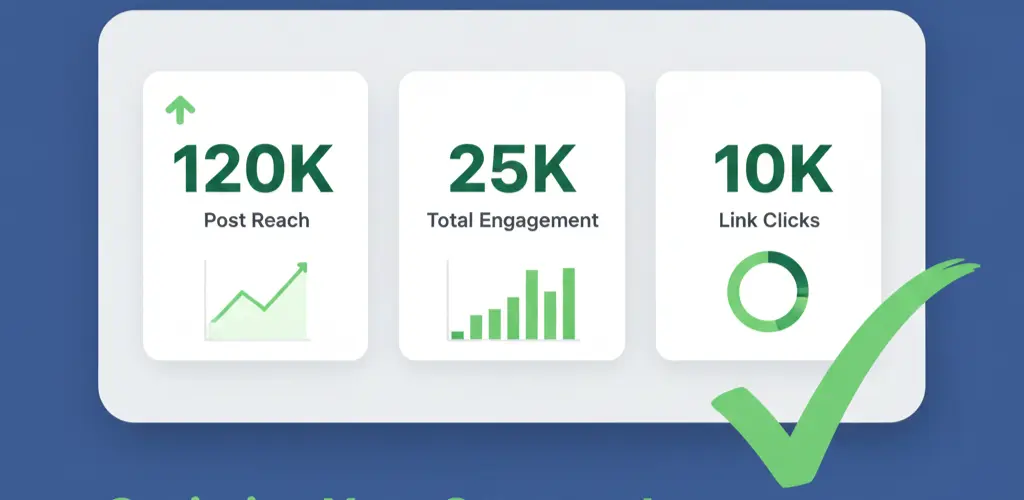
By combining search optimization with data-driven adjustments, you ensure your page attracts the right audience, maximizes engagement, and efficiently generates leads.
How to Optimize for Facebook Search & Insights
- Strategic Tagging, Location, and Category Settings
- Choose the correct primary and secondary categories for your business.
- Set your service area or business location accurately.
- Use relevant tags or keywords in your About section and posts to improve discoverability.
- Use SEO Best Practices for Facebook Pages
- Include target keywords naturally in your business description, services, and posts.
- Optimize photo/video file names and descriptions for search relevance.
- Encourage reviews, comments, and shares as engagement signals for better ranking.
- Monitor Key Metrics
- Track reach, clicks, engagement, and conversions regularly.
- Identify which posts, CTAs, and offers perform best.
- Use insights to guide content strategy, posting schedule, and lead-generation efforts.
- Adjust Strategy Based on Data
- Refine your posting schedule and content type according to engagement trends.
- Test different CTAs, post formats, and visuals for higher conversions.
- Continuously optimize your page using the Facebook page optimization checklist to stay ahead of competitors.
Optimizing for search and insights ensures your Facebook business page is discoverable, engaging, and aligned with your business goals, a critical step in how to optimize your Facebook business page effectively.
Bonus Tips: Advanced Facebook Page Optimization
After finishing the 10-step checklist, elevate your Facebook page using advanced optimization techniques. These strategies greatly enhance your page’s visibility, engagement, and lead generation. They not only improve your ranking in Facebook search results but also integrate effectively with your overall marketing plan.
Advanced Optimization Strategies
- Facebook SEO Tactics
- Use relevant keywords naturally in posts, About section, and services.
- Encourage engagement (comments, shares, reviews) to improve ranking signals.
- Add alt text to images for better search indexing.
- Hashtag Usage for Discovery
- Include 2–5 targeted hashtags in posts to increase discoverability.
- Use industry-specific or trending hashtags to attract your target audience.
- Avoid overloading; keep hashtags relevant to content.
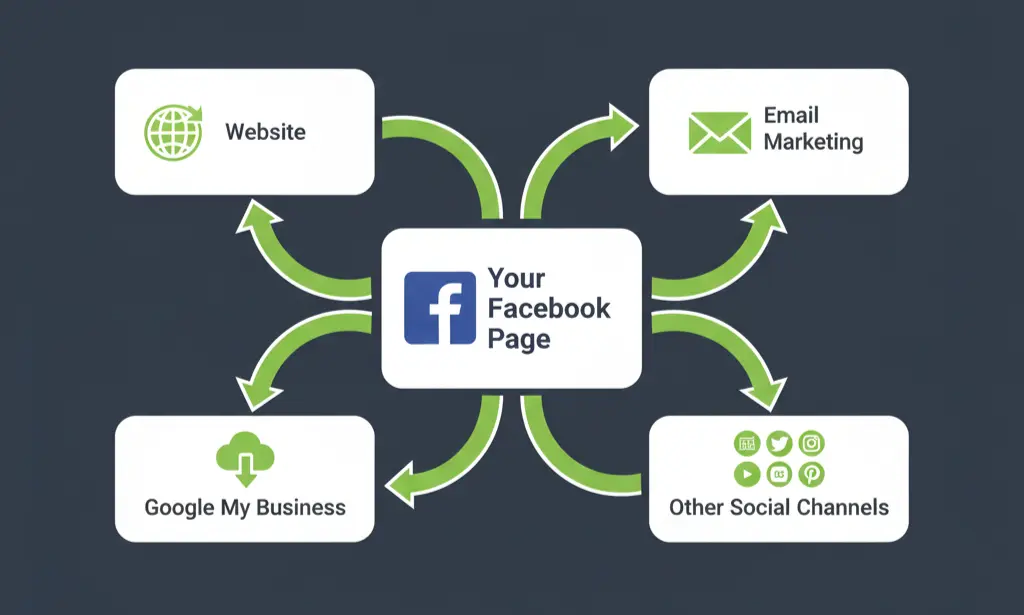
- Integrate Facebook with Other Marketing Channels
- Link your Facebook page in email campaigns, newsletters, and website.
- Share content across Instagram, LinkedIn, and YouTube to drive traffic.
- Use UTM tags to track referral traffic from Facebook to your website.
- Promote Your Page Strategically
- Organic methods: share valuable posts, encourage UGC, participate in groups.
- Paid ads: run targeted campaigns for lead generation or engagement.
- Collaborations & Cross-Promotion: partner with influencers or complementary brands to expand reach.
These advanced strategies complement the core Facebook Page Optimization steps, ensuring long-term growth, higher engagement, and stronger lead generation.
Common Facebook Page Optimization Mistakes
Even after following a complete Facebook Page Optimization checklist, mistakes can prevent your page from performing at its best. Identifying and correcting these common pitfalls ensures your page is discoverable, engaging, and effective at generating leads.
Top Mistakes to Avoid
- Ignoring Analytics and Insights
- Not tracking reach, engagement, clicks, or conversions can leave you blind to what works.
- Use Facebook Insights to refine your strategy and posts continually.
- Wrong Category or Incomplete About Section
- Selecting the wrong primary or secondary category reduces discoverability.
- An incomplete About section with missing keywords can hurt search visibility and user trust.
- No CTA Button or Poor Page Branding
- Missing or unclear CTA buttons reduce conversions.
- Inconsistent logos, low-quality images, or poor cover photos create a weak brand impression.
- Over-posting, Under-posting, or Neglecting Mobile Optimization
- Posting too much can overwhelm followers; too little can reduce visibility.
- Ignoring mobile users (cropped images, unreadable text) can lose potential leads, as most Facebook users access via mobile.
Avoiding these mistakes is critical in how to optimize your Facebook business page effectively, improving both visibility and lead generation.
Conclusion: Master Your Facebook Page Optimization
Optimizing your Facebook business page is more than just filling out basic information; it’s about strategically improving every element to increase visibility, engagement, and leads. By following this 10-step Facebook Page Optimization checklist, you can:
- Make your page discoverable through Facebook search and SEO best practices
- Convert visitors into leads with optimized CTAs, pinned posts, and high-quality content
- Build trust and credibility through reviews, social proof, and consistent branding
- Monitor insights and adjust strategies based on real data for continuous growth
Remember, optimization is not a one-time task. Regularly review your page, track performance metrics, and implement improvements to stay ahead of competitors.
FAQs – Facebook Page Optimization
Q: How does Facebook Page Optimization help my business?
A: Optimizing your Facebook page improves visibility in Facebook search, builds trust, increases engagement, and drives leads. A fully optimized page can convert visitors into customers even without paid ads.
Q:Can I optimize a Facebook page for free?
A: Yes! Most optimization steps, such as updating your About section, uploading high-quality images, configuring CTAs, and organizing tabs, are free. Paid ads are optional for faster growth.
Q:How often should I optimize my Facebook page?
A: Regularly! Review your page at least once a month to update business info, check engagement metrics, adjust CTAs, and refresh pinned posts to maintain high visibility and lead generation.
Q: What is Facebook page SEO, and why is it important?
A: Facebook page SEO is the practice of optimizing your page elements, name, username, About section, category, and posts to improve your ranking in Facebook search. Proper SEO helps potential customers find your business quickly.
Q:Can a small business really benefit from Facebook Page Optimization?
A: Absolutely! Small businesses can increase local visibility, attract leads, and convert visitors into customers by following a strategic 10-step Facebook Page Optimization checklist, even with limited marketing budgets.