
Introduction
Struggling to get local customers from Google Maps? Your Google Business Profile could be the missing piece.
Google Business Profile Optimization Checklist starts with understanding one simple truth: In today’s digital landscape, your online visibility directly impacts your offline success. When someone searches for terms like “plumber near me” or “best coffee shop downtown,” the top results on Google Search and Maps are not regular website links; instead, they are prominent listings from Google Business Profiles (GBPs), previously called Google My Business (GMB).
This is why Google Business Profile optimization for local SEO is essential; it’s now the most critical factor in winning local customers. A well-optimised GBP listing features prominently in the “Local Pack” (the top three map results), immediately boosting your credibility and trust and driving more traffic than organic website listings.
If you’re wondering how to optimise a Google Business Profile, you’ve found the right guide. Use this step-by-step, practical checklist to improve your profile and attract more qualified leads and foot traffic from local searches. The aim is to link your business to the local community and ensure your digital presence is welcoming whenever someone searches.
Understanding the Google Business Profile
What is Google Business Profile?
The Google Business Profile (GBP) is a free, powerful tool offered by Google that helps businesses control their official presence on Google platforms, such as Google Search and Google Maps. Consider your GBP as your online storefront.
It is the central control panel for updating and managing all the essential information customers see when they search for your business or the services you provide. This includes:
- Name, Address, and Phone (NAP) details
- Operating Hours (including special holiday hours)
- Business Categories (e.g., “Coffee Shop,” “Emergency Plumber”)
- Customer Reviews and Ratings
- Photos, Videos, and Posts

GBP vs. Google My Business (GMB): The Name Change
The most common confusion about Google Business Profile optimization stems from its former name.
Note: The Google Business Profile (GBP) is the current name for the tool formerly known as Google My Business (GMB).
Google officially retired the “GMB” name in late 2021 to streamline management. The primary difference is operational:
| Feature | Google My Business (Old) | Google Business Profile (Current) |
| Management | Required a separate GMB dashboard/app. | Management is integrated directly into Google Search and Google Maps. |
| Focus | Dashboard-centric analytics and setup. | Streamlined, real-time updates for quick access. |
The core product and its function in local search remain identical. If you see guides referencing Google My Business profile optimization, they refer to the same essential task as GBP optimization.
How GBP Influences Local Search Rankings
The GBP (Google Business Profile) is the key factor behind local search rankings. Google considers three main factors to determine which local businesses appear highest in search results and in the popular “Local Pack” (the top 3 map listings):
- Relevance: How well your business category and description match the search query (e.g., a search for “pet groomer” should surface profiles categorized as “Pet Groomer”).
- Distance: How close your business is to the searcher’s physical location (or the location they searched for).
- Prominence: How well-known your business is, based on factors like the quantity and quality of reviews, the amount of information you provide, and your overall web authority.
By performing systematic Google Business Profile optimization for local SEO, you are directly improving these three ranking factors.
The Role of GBP in Visibility, Credibility, and Conversions
A complete, optimized profile delivers massive value, far exceeding the minimal Google Business Profile optimization cost (it’s a free tool!):
| Benefit | Description | Impact |
| Visibility | Ensures your business appears in the Local Pack and on Google Maps, the two places where high-intent customers are searching. | 70% more likely to attract a visit or click. |
| Credibility | Detailed information, accurate hours, and professional responses to reviews signal trustworthiness. | 2.7x more likely to be seen as reputable by consumers. |
| Conversions | Features such as the Call Button, Directions, and Website Link allow customers to take immediate action directly from the listing. | 28% of local searches result in a purchase within 24 hours. |
Why Optimize Your Google Business Profile?
Suppose the Google Business Profile Optimization Checklist feels like just another item on your already busy marketing to-do list. It’s essential to realise the significant return on investment (ROI) it offers. Unlike paid advertising, which stops generating leads as soon as your budget runs out, an optimized GBP is a natural, 24/7 lead-generation tool that increases in value over time.
Here are the critical benefits derived from excellent GBP optimization tips and a complete, up-to-date listing.
A. Increased Local Visibility and Dominance
The core purpose of Google Business Profile for Local SEO is to increase your visibility where it matters most: the local search results.
- Appearing in the Local Pack:When a user searches for a service with a local intent (e.g., “best bakery near me”), Google displays the “Local Pack”, a box with a map and the top three business listings. An optimized GBP is the only way to secure one of these prime slots, which often appear above traditional organic website results.
- Google Maps Traffic: A complete profile ensures you appear prominently on Google Maps. Customers relying on GPS or mapping apps are high-intent buyers, and your visibility here translates directly into foot traffic.
- Keyword Matching: By diligently performing Google My Business profile optimization and filling out every field (categories, services, description), you signal to Google exactly what you do. This increases the relevance factor, allowing Google to match you to more specific, varied long-tail keywords customers use.
B. Improved Credibility and Trust
In the local market, trust is everything. A comprehensive and active GBP instantly signals professionalism and reliability to potential customers.
- Social proof through reviews:Your review section is the strongest trust signal. Businesses with high star ratings (4.0+) and many reviews are seen as more reputable. Additionally, responding to reviews (both positive and negative) shows you are an active, caring, and professional owner.
- Data Completeness: Consumers are 2.7 times more likely to consider a business reputable if they find a complete profile on Google Search and Maps. Having accurate hours, a professional description, and high-quality photos reduces customer friction and builds confidence.
C. Higher Conversion Rates
Optimization isn’t just about visibility; it’s about turning a searcher into a paying customer. A well-optimized profile facilitates immediate action without requiring the customer even to visit your website first.
| Optimization Element | Conversion Benefit |
| Call Button | Allows a customer to call you directly with a single tap from the search results, capturing high-intent leads immediately. |
| Directions Link | Converts search intent directly into foot traffic by providing instant navigation. |
| Google Posts | Enables you to run time-sensitive promotions or share events using a Call-to-Action (CTA) button (e.g., “Buy Now,” “Order Online,” “Request a Quote”) right in the search results. |
| Booking Links | If you use a compatible scheduler (like Calendly or Square), customers can book an appointment without leaving the Google interface. |
These streamlined pathways demonstrate that your initial Google Business Profile optimization cost (your time and effort) is paid back many times over through increased, low-friction conversions.
Complete Google Business Profile Optimization Checklist
Optimizing your Google Business Profile (GBP) is essential for local visibility, credibility, and conversions. Let’s start with the first critical step in the Google Business Profile Optimization Checklist.
Step 1: Claim and Verify Your Profile
Before implementing advanced Google Business Profile optimization tactics, you need to claim ownership and verify your GBP. This is the mandatory first step that ensures you have complete, authoritative control over your business details on Google Search and Maps, safeguarding your brand from misinformation.
How to Claim Your Profile
- Go to Google Business Profile.
- Sign in with the Google account you wish to use to manage the business.
- Search for your business by name and location.
- If your business appears, click “Claim this business” or “Own this business?” to initiate the transfer process.
- If it doesn’t appear, click “Add your business to Google” and fill in your essential details (Name, Category, Address).
Verification Methods and Tips
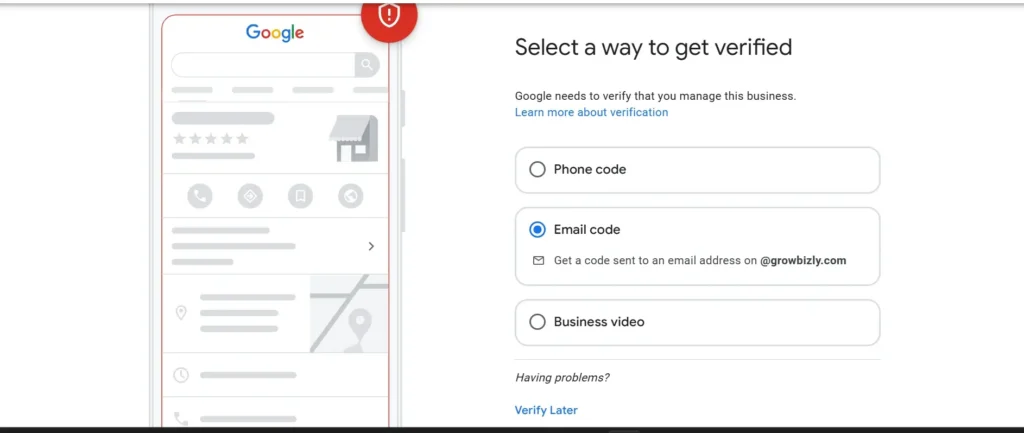
Google requires verification to confirm your ownership. Usually, you cannot select the method; Google determines the best option based on your business type and location.
- Postcard by mail: Google sends a physical postcard with a verification code. This usually takes 5–14 business days.
- Phone verification: Available for some businesses; you’ll receive a code via call or SMS.
- Email verification: Some businesses can verify via an email sent to an address associated with the business domain.
- Video verification: A newer method requiring you to record a short video showing your location, equipment, and proof of management.
- Instant verification: Rare, but possible if your website is already verified with Google Search Console under the same account.
Tips:
- Make sure your address and business name match official documents and are consistent with every other online directory (NAP Consistency—more on this later).
- Avoid using P.O. Boxes; Google strictly prefers a physical, staffed business address for verification.
- Start the verification process as soon as possible. No further Google My Business profile optimization can occur until the listing is verified.
Common Verification Issues and Solutions
| Issue | Cause | Solution |
| Postcard not arriving | Mail error or address mismatch. | Wait the whole two weeks, then request a new postcard. Double-check the address format. |
| Verification code expired | Code was entered too late (codes expire). | Start the verification process again and input the code immediately upon receipt. |
| Profile already claimed | The previous owner or employee has control. | Click “Request access” and follow the prompts. Be prepared to wait 7 days for a response from the current owner. |
Step 2: Set Up Business Information
Precise and comprehensive business details are essential for a robust GBP. This encompasses your NAP (Name, Address, Phone), categories, business description, operating hours, and service areas. Such information is fundamental to optimizing your Google Business Profile optimization for local SEO.
1. Business Name, Address, Phone (NAP Consistency)
- Use your exact legal business name—avoid extra keywords or location names that aren’t part of the official name.
- Ensure your address and phone number are consistent across all online listings (website, social profiles, directories).
- Inconsistencies confuse Google and reduce local SEO effectiveness.
2. Categories and Attributes
- Primary category: Choose the main category that best describes your business (e.g., “Plumber,” “Coffee Shop”).
- Secondary categories: Add 2–5 relevant categories to cover your services.
- Attributes: Add attributes like “wheelchair accessible,” “outdoor seating,” or “women-led” depending on your business.
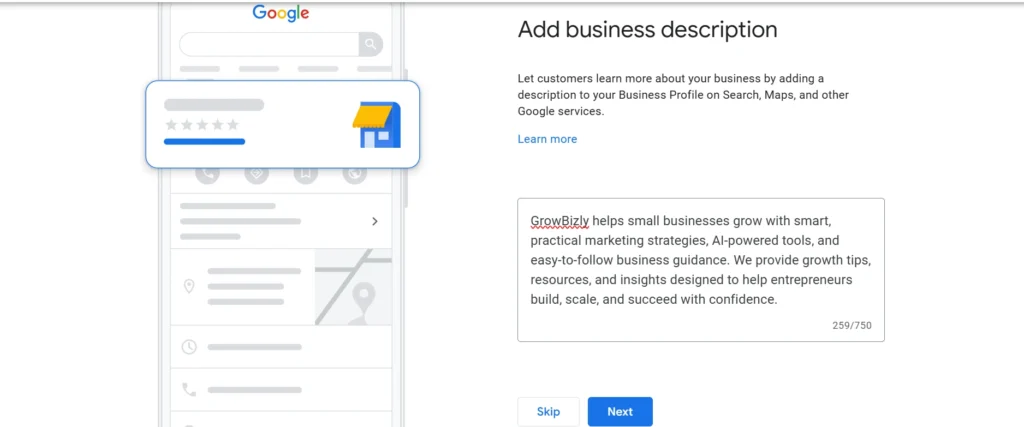
3. Business Description & Keywords
- Write a clear, engaging description of your business in 750 characters or fewer.
- Include relevant keywords naturally, e.g., “Google Business Profile optimization for local SEO” or “how to optimize a Google business profile”.
- Focus on value for customers rather than stuffing keywords.
4. Business Hours and Special Hours
- Add regular business hours accurately.
- Include special hours for holidays, events, or temporary closures.
- Accurate hours improve trust and reduce missed opportunities.
5. Service Areas for Local Targeting
- Define geographic areas you serve if you deliver or offer on-site services.
- Helps Google show your business for local searches in those areas.
Step 3: Add High-Quality Photos & Videos
After securing your foundational data, the next step in how to optimize a Google Business Profile is uploading rich media. Listings with photos and videos get 42% more requests for driving directions and 35% more clicks to their websites than those without.
1. Profile & Cover Photo Guidelines
- Profile photo: Your logo or a clear brand image; this is the first thing users see.
- Cover photo: A visually appealing image representing your business, ideally showing your environment or service in action.
- Size & quality: Use high-resolution images (at least 720×720 px). Avoid blurry or pixelated photos.
2. Interior, Exterior, Products/Services Images
- Interior & exterior: Show your physical location so customers can recognize it.
- Products & services: Showcase your offerings with clear, well-lit photos.
- Consistency: Maintain branding colors and style for professionalism.
3. Videos, Virtual Tours, and Emotional Storytelling
- Videos: Short clips (30–60 seconds) showing your services, team, or customer experience.
- Virtual tours: Let customers explore your business digitally; Google My Business supports 360° tours.
- Emotional storytelling: Showcase customer satisfaction, team culture, or unique experiences to connect emotionally.
4. Tips for SEO-Friendly Visuals
- File names & alt text: Use descriptive names and keywords, e.g.,
coffee-shop-local-seo.jpg. - Compress images: Optimize for fast loading without losing quality.
- Regular updates: Add seasonal or new product photos to signal activity to Google.
Step 4: Craft a Compelling Business Description
Your business description is one of the first things users read when they find your profile. It should clearly communicate your value while helping Google understand your business for local searches.
1. Writing an SEO-Friendly, Engaging Description
- Keep it clear, concise, and easy to read (up to 750 characters).
- Focus on what your business does, who it serves, and the benefits.
- Include a call-to-action if appropriate (e.g., “Visit us today for a free consultation”).
2. Highlighting Unique Selling Points (USPs)
- Emphasize what makes your business different from competitors.
- Examples of USPs:
- 24/7 customer support
- Eco-friendly products
- Experienced, certified staff
- Fast delivery or service turnaround
3. Keyword Placement Without Stuffing
- Include primary and secondary keywords naturally, such as:
- Google Business Profile Optimization for Local SEO
- How to optimize a Google business profile
- Avoid repeating keywords unnaturally; focus on readability and user intent.
- Place keywords in the first 1–2 sentences for better SEO impact.
Pro Tip:Review your business description regularly, ideally every few months. Incorporate seasonal offers, new services, or customer-centric language to indicate activity to Google and maintain an updated profile.
Step 5: Add Products & Services
Accurately and attractively showcasing your products and services is vital for a professional GBP. It also helps Google match your business to relevant local searches. This is an essential part of optimizing a Google Business Profile for niche searches.
1. Listing Products/Services Clearly
- Create a separate entry for each product or service.
- Use clear, simple names that customers recognize.
- Avoid overly technical terms unless your audience is familiar with them.
2. Optimizing Descriptions and Categories
- Write short, engaging descriptions for each product/service. Include benefits and features.
- Use relevant categories so Google understands what you offer (e.g., “Plumbing Services,” “Organic Coffee Beans”).
- Sprinkle relevant keywords naturally for local SEO impact.
3. Pricing Transparency and Images
- Include pricing or price ranges if possible. Transparency builds trust and reduces friction.
- Add high-quality images of products or service results. Images should be well-lit and clearly show the item.
- For services, include before-and-after photos or visuals of the service in action.
Pro Tip: Update your products and services regularly. Seasonal items, promotions, or new services keep your profile active and improve local search visibility.
Step 6: Collect & Manage Reviews
Reviews shape customer perceptions and directly impact your business’s visibility in local search results. Effective management of this area is a core component of sustainable optimisation of Google My Business.
1. Importance of Reviews for Local SEO
- Google prioritizes businesses with high ratings and a large number of reviews in local search results and Google Maps.
- Reviews increase trust and credibility, influencing potential customers’ decisions.
- They provide fresh content for Google to understand your business offerings.
- When customers use keywords in their reviews (e.g., “The AC repair service was fast”), those phrases reinforce your relevance for those terms, boosting your Google Business Profile optimization for local SEO.
2. Encouraging Positive Reviews Ethically
- Ask satisfied customers politely in person, via email, or via SMS to leave a review.
- Make it easy with direct links to your Google review page.
- Avoid incentivizing reviews, which violates Google’s policies.
- Example CTA: “We’d love your feedback! Share your experience with us on Google.”
3. Responding to Reviews (Positive & Negative)
- Positive reviews: Thank customers and personalize responses.
- Negative reviews: Respond politely, acknowledge the issue, and offer solutions.
- Timely responses show active engagement, boosting credibility and SEO.
4. Using Review Monitoring Tools
- Tools like Podium, Grade.us, or Google Alerts help track and manage reviews efficiently.
- Set notifications for new reviews to respond promptly.
- Monitor trends to identify common feedback and improve services.
Pro Tip: Make review management a regular part of your workflow. Prompt responses, ethical review collection, and monitoring can significantly improve rankings, customer trust, and conversions.
Step 7: Post Updates & Offers Regularly
Google Posts are perhaps the most underutilized tool in the entire Google Business Profile Optimization Checklist. They allow you to publish short, timely updates directly onto your profile, where they appear prominently in the search results. They are a free, effective way to communicate with potential customers and improve your ranking.
A. Types of Google Posts for Engagement
There are several types of posts you can use, each designed for a different goal:
| Post Type | Purpose | Best Use Case |
| Offer | Promote sales, discounts, or special deals. | Holiday sales, first-time customer discounts, seasonal clearances. |
| What’s New | General news, announcements, or updates. | New products, new staff members, changes to service offerings. |
| Event | Announce a specific occurrence with a start and end date/time. | Grand openings, workshops, webinars, and local sponsorship events. |
| Product | Showcase a specific product with pricing and a purchase link (often overlaps with the Products section). | Launching a limited edition item or featuring a best-seller. |
Every post allows for an image or video, up to 1,500 characters of text, and most importantly, a Call-to-Action (CTA) button (e.g., “Learn More,” “Call Now,” “Order Online”).
B. Frequency & Engagement Tips
A key element of effective Google Business Profile optimization is showing Google that your business is active.
- Maintain Consistency: Aim to post at least once per week. Posts generally expire after 7 days (or the end date of an event/offer), so consistent publishing is required to keep something live on your profile.
- Use Strong CTAs: Always include a compelling CTA. The goal is to move the customer from the search result directly to your conversion goal (a phone call, a purchase, or a booking).
- Keyword Integration: Even in short posts, naturally include your target keywords and service areas to boost your relevance for those terms. Example: “Don’t miss our special event next Friday on how to optimize a Google Business Profile for local leads in Atlanta!”
C. Leveraging Seasonal Promotions
Use Google Posts to capitalize on real-world events and seasonality, demonstrating to Google and customers that you are a relevant, timely business.
- Holidays: Post special hours, holiday menus, or gift card promotions for occasions like Mother’s Day, Thanksgiving, or Christmas.
- Seasonal Services: An HVAC company should use posts to announce “Spring AC Check-up Special” or “Winter Furnace Tune-up Deals.”
- Local Events: Post about your participation in local community fairs or sponsorships.
Step 8: Enable Messaging & Appointment Features
Today’s customers prefer quick, smooth contact methods over phone calls or visiting websites. Implementing advanced communication features is essential to enhance the ROI of your Google Business Profile optimization.
1. Turn on Messaging
- Enable messaging in your GBP dashboard under the “Messages” tab.
- Customers can send you direct messages via Google Search or Maps.
- Tips for effective messaging:
- Respond promptly (within 24 hours).
- Use friendly, professional language.
- Automate greetings to acknowledge messages instantly.
2. Appointment Booking Integration
- Connect your preferred scheduling tool (like Calendly, Acuity, or a booking system supported by Google).
- Allows customers to book services directly from your GBP profile.
- Ideal for service businesses like salons, clinics, or consultants.
3. Quick Response Strategy
- Set response templates for common questions (e.g., pricing, hours, services).
- Monitor notifications to ensure timely replies, building trust.
- Encourage customers to complete appointments or ask follow-up questions.
Pro Tip:Maintain messaging and booking as part of your daily routine. Quick, helpful responses boost customer satisfaction, increase conversions, and enhance local SEO rankings.
Step 9: Manage Q&A Section
The Q&A feature enables potential customers to ask questions directly on your GBP listing. Managing it actively helps ensure accurate information, builds trust, and enhances search visibility.
1. Answering Customer Questions Effectively
- Respond promptly to all questions to show active engagement.
- Provide clear, concise, and helpful answers. Avoid generic responses.
- Include links to your website or relevant posts when applicable.
2. Encouraging User-Generated Q&A
- Encourage customers or staff to post common questions and answers to preempt inquiries.
- Examples:
- “Do you offer curbside pickup?” → Answer: “Yes, available 9 AM–6 PM daily.”
- “Do you provide free consultations?” → Answer: “Absolutely, schedule via our booking link.”
- This builds a self-help resource for future customers.
3. SEO Benefits
- Keywords in Q&A: Naturally include relevant keywords in questions and answers (e.g., how to optimize a Google business profile, Google Business Profile Optimization for Local SEO).
- Fresh content: Regular updates to Q&A signal activity to Google, helping your listing rank higher.
- Long-tail search queries: Answering specific questions can capture highly relevant local searches.
Pro Tip:Check your Q&A section weekly. Active management stops misinformation, builds customer trust, and boosts local SEO.
Step 10: Track Insights & Analytics
Completing the steps in this Google Business Profile Optimization Checklist is just the beginning, not the end. The key to staying ahead locally is ongoing improvement, which means closely watching your GBP Insights. Understanding this data reveals the real-world impact of your Google Business Profile optimization efforts.
1. Understanding GBP Metrics
Key metrics to monitor:
- Views: How many times your profile appeared in search results or Google Maps.
- Search queries: Which keywords customers used to find your business.
- Customer actions: Clicks to your website, calls, direction requests, and bookings.
- Photo and post engagement: Which images or posts drive the most interaction?
2. Using Insights to Adjust Local SEO Strategy
- Analyze which queries drive traffic and optimize your business description, categories, and posts accordingly.
- Identify high-performing posts or photos and replicate success in future updates.
- Adjust service areas or hours based on customer search trends.
- If you have high views but low clicks (Website/Calls/Directions), your profile might be lacking compelling content (like poor photos, few reviews, or a weak description). This signals where you need to apply more focused GBP optimization tips.
3. Integrating with Google Analytics and UTM Tracking
- Connect your GBP to Google Analytics to monitor website traffic from your profile.
- Use UTM parameters on links in posts or offers to track campaign performance.
- Combining GBP insights with analytics data gives a complete picture of ROI.
- Benefit: This allows you to track not just the click, but also what the user did after the click (e.g., did they book an appointment? Did they view pricing?)—giving you a precise calculation of the ROI of your Google Business Profile Optimization cost (your time and effort).
Pro Tip:Regularly review your insights weekly or monthly. Making adjustments based on data can enhance local SEO rankings, increase engagement, and boost lead conversions over time.
Step 11: Advanced Optimization Techniques
Once you have completed the 10 core steps, these advanced strategies represent the next level of Google Business Profile optimization, helping you dominate niche searches and prepare for the future of local search (like voice search).
A. Google Attributes for Niche Targeting
Google Attributes are unique tags that provide customers and search engines with detailed, often highly relevant information about your business. They go beyond basic categories and are typically displayed as prominent icons in the knowledge panel.
- Diversity & Inclusion: Attributes like “Women-led,” “Veteran-owned,” “Black-owned,” “LGBTQ+ friendly,” or “Transgender safe space” allow you to target customers actively looking to support diverse businesses.
- Amenities & Services: These vary by category (e.g., “Free Wi-Fi,” “Wheelchair accessible,” “Outdoor seating,” “Accepting new patients”).
- Strategic Value: Actively selecting every relevant attribute (found under the “More” tab when editing your profile) allows your business to appear in precise, filtered searches (e.g., a searcher filters for “restaurants with outdoor seating”). This is a low-effort, high-impact GBP optimization tip.
B. Geo-Tagging Images for Local Relevance
While the direct ranking impact of geo-tagging has been debated, it remains a best practice in the Google Business Profile Optimization Checklist for reinforcing location signals.
- What is Geo-tagging? It is the process of embedding specific geographic coordinates (latitude and longitude) into the metadata (EXIF data) of your image files before you upload them.
- How to Implement:
- Use a GPS-enabled phone to take pictures at your business location (this tags them automatically).
- Use a free online geo-tagging tool (like GeoImgr) to input your business’s coordinates into the photo files manually.
- Benefit: When Google processes your images, the embedded data reinforces the connection between the image’s subject matter (e.g., “AC repair”) and your physical address, providing another location signal for your Google Business Profile for local SEO.
C. Optimizing for Voice Search
The rise of smart speakers and mobile assistants means an increasing number of local searches are conducted via voice (e.g., “Hey Google, find a dry cleaner near me that is open now”).
- Conversational Keywords: Voice search queries are typically longer and more conversational than typed searches. Ensure your Q&A answers, service descriptions, and business description use whole, natural language sentences that anticipate these questions.
- Accuracy is King: Voice assistants often rely on the most accurate and complete information, giving immense weight to your operating hours, address, and primary category. Consistency across all platforms is paramount.
D. Using Backlinks & Citations for Local Signals
The Prominence ranking factor is heavily influenced by your business’s presence across the rest of the web. This is where traditional SEO and local SEO meet.
- Citations (NAP Consistency):A citation is any mention of your business Name, Address, and Phone Number (NAP) on other websites, such as Yelp, Yellow Pages, local business directories, or Chamber of Commerce sites. High-quality, consistent citations signal to Google that your business is legitimate and confirm the information on your GBP.
- Backlinks: Links from other reputable websites (especially local news sites, blogs, and partners) pointing to your business website signal authority and prominence to Google, which indirectly boosts your GBP’s local ranking potential.
Step 12: Regular Audits & Maintenance
The ultimate Google Business Profile optimization checklist involves ongoing monitoring and upkeep. Since Google frequently updates its interface and ranking criteria, and your competitors are constantly working to surpass you, regular audits are crucial. They keep your profile current, relevant, and accurate, essential for maintaining high rankings.
1. Periodic Updates of Business Info
Set a schedule (monthly or quarterly) to review the core data on your profile. This is crucial for maintaining the credibility gained through previous Google My Business profile optimization.
- Check that Name, Address, Phone (NAP) are consistent across all platforms.
- Update business hours, categories, and attributes as needed.
- Ensure website links, social media profiles, and appointment links are working.
2. Seasonal Updates & Promotional Changes
- Update photos, posts, and offers to match seasonal campaigns or holidays.
- Add limited-time promotions or event announcements to stay relevant.
- Seasonal updates signal to Google that your business is active, helping with rankings.
3. Competitor Monitoring
Understanding how to optimize a Google Business Profile means knowing what the competition is doing. You should regularly monitor the Local Pack for the main keywords related to your business.
- Keep an eye on local competitors’ GBP listings.
- Identify gaps or opportunities in their photos, posts, reviews, or services.
- Adjust your profile strategy to stay competitive and improve your local SEO advantage.
- Identify Gaps: Use this competitor analysis to spot gaps in your own Google Business Profile Optimization Checklist implementation, such as a missing secondary category or a service you forgot to list.
Pro Tip: Schedule quarterly audits to keep all information current. Regular maintenance boosts local search visibility, builds customer trust, and increases overall conversions.
Common Google Business Profile Mistakes to Avoid
Even with the Google Business Profile Optimization Checklist, businesses often make mistakes that reduce visibility, engagement, and conversions. Avoiding these pitfalls ensures your profile works effectively for local SEO.
1. Incomplete Profile or NAP Inconsistency
- Failing to provide a complete Name, Address, Phone number (NAP), or business details confuses Google and customers.
- Inconsistent NAP across directories can harm local SEO rankings.
- Always double-check that your profile information matches your website and other listings.
2. Duplicate Listings
- Multiple GBP listings for the same business can dilute reviews, confuse customers, and negatively impact rankings.
- Regularly search your business name on Google Maps to detect duplicates and request removal if needed.
3. Ignoring Reviews or Posts
- Not responding to reviews or failing to post updates reduces engagement and credibility.
- Active profiles with regular posts, offers, and responses perform better in local search.
4. Keyword Stuffing
- Overloading descriptions, services, or posts with keywords can hurt readability and violate Google guidelines.
- Focus on natural keyword integration, user experience, and clear messaging.
5. Mismanaging Q&A
- Leaving customer questions unanswered or posting inaccurate info can damage trust and SEO.
- Actively manage the Q&A section, respond promptly, and encourage helpful user-generated questions.
Pro Tip: Regularly audit your profile using the checklist to prevent mistakes. Consistency, responsiveness, and accurate information are critical for boosting local SEO, engagement, and conversions.
Bonus Tips for Local SEO Success
To maximize the impact of your Google Business Profile Optimization Checklist, implementing these bonus strategies can significantly boost your local SEO, engagement, and conversions.
1. Embed Google Maps on Your Website
- Adding a Google Maps widget on your contact or location page helps users find you easily.
- Signals to Google the physical presence of your business, improving local relevance.
- Example: Embed a map showing your store location with a clear pin.
2. Add FAQ Content to Your Profile
- Include common questions and answers directly on your GBP or linked pages.
- Helps capture long-tail search queries and improves user experience.
- Example questions: “Do you offer delivery?” “What are your service areas?”
3. Use Local Schema Markup
- Implement local business schema on your website to provide structured data to Google.
- Helps Google understand your business type, location, hours, and services.
- Improves visibility in rich snippets, local packs, and voice search.
4. Encourage User-Generated Content
- Ask customers to share photos, reviews, or testimonials on your GBP or social channels.
- User content adds fresh, authentic signals for local SEO and builds trust.
- Example: Customers posting photos of their visit or product usage.
Pro Tip: Combining these bonus strategies with the main checklist ensures your GBP is not just complete, but fully optimized for maximum local SEO impact. Regular updates and user engagement are key to maintaining top visibility.
Conclusion
Optimizing your Google Business Profile is no longer optional—it’s a critical step for local SEO, visibility, and customer trust. By following this Google Business Profile Optimization Checklist, you ensure your business:
- Appears in relevant local searches and Google Maps.
- Builds credibility through accurate information, high-quality visuals, and active review management.
- Converts searchers into customers via posts, messaging, and appointment features.
- Stays competitive through advanced techniques, regular audits, and local SEO strategies.
Remember, consistency and engagement are essential. Regularly updating your profile, responding to reviews, posting offers, and using advanced techniques such as geo-tagging and schema markup will keep your business top-of-mind with both customers and Google.
Start implementing these steps today, track your insights, and watch your local search presence grow. With a fully optimized GBP, you’re not just listing your business—you’re turning searches into loyal customers.
FAQs – Google Business Profile Optimization Checklist
1. How long does it take to see results from GBP optimization?
✔ Most businesses notice initial improvements in visibility and engagement within 2–6 weeks.
✔ Full local SEO impact, such as higher Google Maps rankings, can take 2–3 months depending on competition and activity level.
2. Can I manage multiple locations from one account?
✔ Yes. Google Business Profile allows you to manage multiple locations under a single account.
✔ Use location groups to manage posts, photos, reviews, and insights efficiently for all locations.
3. How often should I update profile photos and posts?
✔ Photos: Add fresh images at least once per month to show activity.
✔ Posts: Share updates, offers, or news 1–3 times per week to engage customers and improve SEO.
4. Does responding to reviews improve local rankings?
✔ Absolutely. Timely responses to reviews signal engagement and credibility to Google.
✔ Respond to both positive and negative reviews to boost trust, conversions, and ranking potential.
5. Google My Business vs Google Business Profile
✔ Google My Business (GMB) is the older platform; Google Business Profile (GBP) is its modern version.
✔ GBP offers enhanced insights, messaging, posting, and appointment features.
✔ Optimization strategies are similar, but the GBP interface provides more engagement tools.